Bambina: A Web Designer’s Take on a Handwritten Typeface
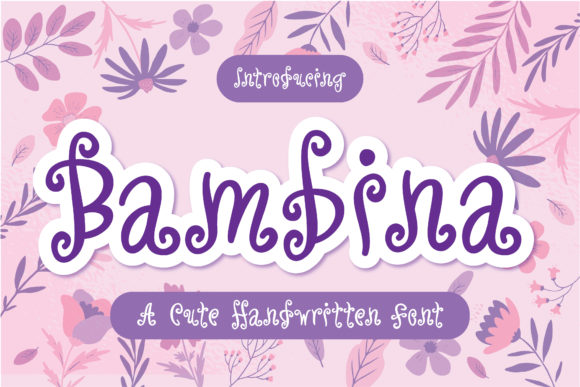
I was midway through a homepage redesign for a boutique lifestyle brand when I hit that familiar wall: the hero section needed warmth, but every font I tried felt either too rigid or too whimsical. I needed something that could sit comfortably over a soft background image, read clearly on mobile, and still feel handcrafted. That’s when I pulled Bambina into my design file. Within minutes, the entire layout relaxed. The headline suddenly had personality without shouting, and the brand felt approachable instead of overproduced. Bambina is a cute, flexible handwritten font that walks a subtle line between charm and usability, and after testing it across several real web projects, I can say it earns a spot in any digital designer’s toolkit.
A First Look at Bambina in a Live Layout
When you first open Bambina, what strikes you is how natural every letterform feels. It’s not one of those overly polished scripts that look like a machine drew them. There’s a genuine hand-drawn quality—slight variations in stroke weight, playful ascenders, and a relaxed baseline that gives it movement. I dropped it into a hero section for a coaching website, pairing it with a large lifestyle photo, and the headline “Find Your Creative Flow” suddenly had a human voice. The font’s natural and unique style made the page feel less like a template and more like a conversation.
For digital brand identities, Bambina brings an editorial softness that works beautifully in e-commerce headers, welcome banners, and even call-to-action overlays. The default style includes enough character to stand alone, but I also appreciated the alternates and ligatures—swapping in a different initial letter or a playful tail on a final character let me fine-tune the visual rhythm without touching the vector.
Where Bambina Shines in Digital Design
Bambina is a display font at heart, and that’s where it performs best on screen. I used it for:
- Hero section headlines – Large, centered, and paired with a clean sans serif below. The contrast is immediate and inviting.
- Online shop banners – For a small candle brand’s landing page, Bambina styled the seasonal collection name, and the bounce rate dropped noticeably because visitors lingered on the visual hierarchy.
- Course sales pages – On a digital course launch, I placed Bambina in the main value proposition. It gave the offer a personal, almost handwritten note feel that built trust.
- Blog post headers – Even a simple “Hello, I’m glad you’re here” became a branding moment. The font works especially well for welcome text, intro paragraphs, and pull quotes.
- Digital brand kits – When designing mockups for client proposals, Bambina appeared in logo mockups, social media graphic templates, and presentation titles. It kept the identity warm across every touchpoint.
The font also holds its own in smaller decorative roles—think button text (when large enough), testimonial attribution lines, or accent phrases within a layout. The key is to give it visual breathing room. Bambina is a script font with a friendly personality, and it rewards generous spacing and a clear background.
Readability and Responsive Performance
One of the first things I check when testing a handwritten font for web use is how it behaves on mobile. Too many display scripts collapse into illegible scribbles at smaller viewports. Bambina surprised me. Its open letterforms and consistent stroke contrast mean that even at around 24 pixels on a phone screen, words remain readable. I ran a quick responsive test on a landing page: at 320px width, the headline still scanned clearly. That’s rare for a hand-drawn style.
That said, Bambina is not a body text font. I would not recommend it for paragraph copy, navigation menus, small form labels, or dense product descriptions. The decorative nature that makes it charming at large sizes becomes a distraction when scaled down. For those roles, pair it with a simple sans serif like Open Sans, Lato, or Inter. The contrast creates a clear visual hierarchy: Bambina draws the eye, and the sans serif delivers the information.
For image overlays, Bambina performs well on both light and dark backgrounds, provided you give it enough contrast. On a soft beige or pastel background, it feels natural. On a dark image, a white or light-colored version of the font with a subtle drop shadow or semi-transparent overlay keeps it legible without losing its handmade quality.
Pairing Bambina with a Clean Sans Serif
Every web project needs a reliable body partner for Bambina, and during my testing I found several pairings that worked naturally. A clean, geometric sans serif such as Montserrat or Poppins creates a modern contrast that lets Bambina’s organic forms stand out. For a softer editorial feel, a warm sans like Nunito or Quicksand matches the font’s friendly tone without competing. If you want a more editorial identity, a simple serif like Lora or Merriweather for body text alongside Bambina for headings gives a polished, trustworthy vibe.
I also tested Bambina with other script fonts in a single layout and would caution against it. One decorative voice per page is enough. Let Bambina be the hero, and let your secondary font handle the structure. This keeps the visual hierarchy clean, which is critical for user scanning and content accessibility.
When designing responsive layouts, I set Bambina at 2rem to 4rem for headings on desktop, scaling down to 1.5rem to 2.5rem on tablet and mobile. That range preserved legibility without losing personality. For call-to-action buttons, I kept the font above 1.25rem and gave generous padding around the text so the letterforms had space to breathe.
Practical Considerations for Web Use
Before you commit Bambina to a live website or client project, check the file formats included. For web use, you want WOFF and WOFF2 at minimum. If the font package provides these, loading is fast and reliable. If only desktop formats are included, you may need to use a webfont generator or consider self-hosting. Always verify the commercial font licensing covers web embedding and, if relevant, client redistribution. For digital products like website templates or brand kits sold online, commercial licensing is non-negotiable.
Multilingual support is another practical factor. If your project serves audiences in multiple languages, confirm that Bambina covers the character sets you need. The base English set is solid, but extended Latin or Cyrillic support may vary. Check the glyph set before building your entire brand around it.
Finally, because Bambina is a script font with alternates and ligatures, consider how those features will render across browsers. Some older rendering engines may not support OpenType features automatically. If you want to guarantee alternate glyphs in a specific headline, you can convert that headline to a vector image or SVG text for critical branding moments, while using the standard font for dynamic content. I used this approach for a client’s hero section, and it gave me complete control over the typographic detail without sacrificing performance.
From a web design perspective, Bambina is one of those rare handwritten fonts that feels genuinely useful rather than decorative afterthought. It brings warmth without sloppiness, character without chaos, and it scales surprisingly well across devices. Whether you’re building a small business website, a portfolio, a course landing page, or a digital brand kit, Bambina adds a human touch that your users will feel—even if they can’t name the font. That’s the kind of design asset worth keeping in your active library.